top of page

Role
Product Designer
Team
8 people
Timeline
Mar 2024 - Jun 2024
Introduction
Bynder, a leader in enterprise Digital Asset Management (DAM) services, serves a diverse range of clients, from Fortune 500 companies to SMEs.
As the company scaled, the existing asset upload system began to show its age, accumulating significant design debt. It was becoming increasingly difficult for engineering teams to maintain and extend due to its reliance on legacy systems. The outdated design and technical limitations were slowing down both users and development processes.
To address these challenges, I was tasked with redesigning the asset ingestion pipeline, creating a modern, scalable, and efficient solution.
Side note : Enrichment

When a user uploads a file to a Digital Asset Management (DAM) system, it undergoes a process called enrichment. During this process, additional data is attached to the file to enhance its accessibility.
For example, if a photographer uploads files to the DAM, metadata such as the location, category, team, etc. is added, to enable other DAM members such as marketers to access and use it efficiently.
Problems

Inconsistent Experience & Forced Workarounds - Having three different uploaders available often left users confused about which one to choose. Each uploader was designed for a specific audience with distinct requirements, but switching between them frequently resulted in the wrong uploader being used. Additionally, we observed users resorting to workarounds to compensate for feature gaps.

Manual Enrichment at Scale - Managing large-scale asset ingestion was a frequent but labor-intensive task. Many steps were repetitive, yet the lack of automation significantly prolonged the process. As a result, DAM administrators often felt overworked and frustrated, leading to a higher rate of errors.

Non–collaborative system - DAM admins frequently collaborated with freelancers within the organization. Their role involved enriching assets uploaded by freelancers, but since they lacked the necessary information, they had to communicate outside the Bynder ecosystem. This back-and-forth process often resulted in incorrect file uploads or inaccurate asset enrichment.
Solution
To develop the optimal solution, I adopted a mixed-method approach to UX research. I conducted qualitative research through user interviews, focus group studies, and competitive benchmarking to gain a deeper understanding of user needs and pain points. Simultaneously, I gathered quantitative insights by analyzing data from the existing system to identify usage patterns and performance gaps.
Armed with these research insights, I developed targeted solutions that directly addressed the core challenges, ensuring the redesign was both user-centric and data-driven.
Unified upload experience

To address the challenge of the platform having three separate uploaders, I designed a unified uploader with a streamlined information architecture. The new uploader organizes files into batches, allowing users to upload a collection of files, enrich them with additional metadata, and then publish them directly into the asset bank, where they are accessible to everyone. This uploader consolidates the functionalities of all three previous uploaders, ensuring both new users and power users feel comfortable and efficient while using it. Additionally, it supports enrichment at both small and large scales, catering to diverse user needs.


Screenshot of v1
V1, V2, V3...
In the first version of the redesign, I focused on validating a core assumption: users wanted a table view for enrichment. I added highly requested thumbnails, surfaced details like file type and size, and introduced rudimentary filters. During enrichment, files could be published, but if required metadata was missing the publish button was disabled, protecting the integrity of assets entering the bank. Results showed the table view hit the mark, while file extension/size info landed lukewarm despite our storage‑tier pricing rationale. More troubling, mixed rows of published and unpublished files created confusion, and users couldn’t tell which files were actually publishable.

Screenshot of v1
The second iteration tackled these issues and layered in power features: separate Drafts and Published views, a toolbar for copy/paste and undo/redo, column show/hide controls, and a redesigned publish modal that surfaced all eligible files without auto-selecting them. Users appreciated the new tools (especially shortcuts) so much that over 90% barely touched the toolbar after learning them; however, the “View” dropdown label confused people, and the modal itself felt muddled.

Screenshot of v2
Between the second and the third iteration, product and engineering aligned on a simplifying principle: the uploader isn’t a ledger, it’s a delivery vehicle. All upload items are drafts; once published, they disappear from the table. I renamed “View” to “Columns,” applied progressive disclosure to declutter the UI, made actions like sorting contextual (e.g., via a three-dot menu), and nested quick actions instead of keeping a persistent toolbar. To address smaller, high-variance uploads identified in our data, I introduced a grid view that mirrors the main uploader’s interaction pattern with an inspector panel for enrichment. The publish modal was rebuilt to be clear and concise, showing only selected files, skipping those ineligible, and explicitly explaining why.


Screenshots of v3, grid view and publish modal
No-code automation
Users frequently requested an automation feature to streamline large-scale file uploads, as the manual screening process by DAM admins caused significant delays and bottlenecks. This inefficiency impacted productivity and user satisfaction, making a scalable solution essential.
To solve this, I designed a no-code, user-friendly automation system with two workflows. Manual automation allowed users to initiate specific uploads, while continuous automation operated in the background, processing files seamlessly and ensuring metadata integrity.
The continuous automation feature was especially impactful, reducing error rates and enabling DAM admins to prevent unauthorized access and bot-like attacks.


Collaborative editing
As identified through user testing and interviews collaboration was a highly requested feature. Teams expressed challenges in managing tasks and working together efficiently. Based on these insights, I designed the new uploader to enable seamless teamwork. Beyond real-time simultaneous metadata editing, collaboration was embedded into the uploader's core functionality.
Users could assign tasks to team members, fostering ownership and accountability. The system’s asynchronous nature allowed global teams to collaborate effortlessly, enabling everyone to contribute on their own schedule.


Automatic metadata generation (AI)
Manually tagging assets in a DAM system is a time-consuming and error-prone process, leading to inconsistent metadata and reduced searchability. Users needed a more efficient way to organize and tag assets without compromising accuracy. The challenge was to leverage AI to automate metadata generation, enabling the system to analyze images, videos, and documents to identify content, detect objects, recognize faces, and interpret contextual details. By addressing this problem, the solution aimed to accelerate asset organization, ensure consistent metadata quality, and significantly enhance the search experience.


Design System
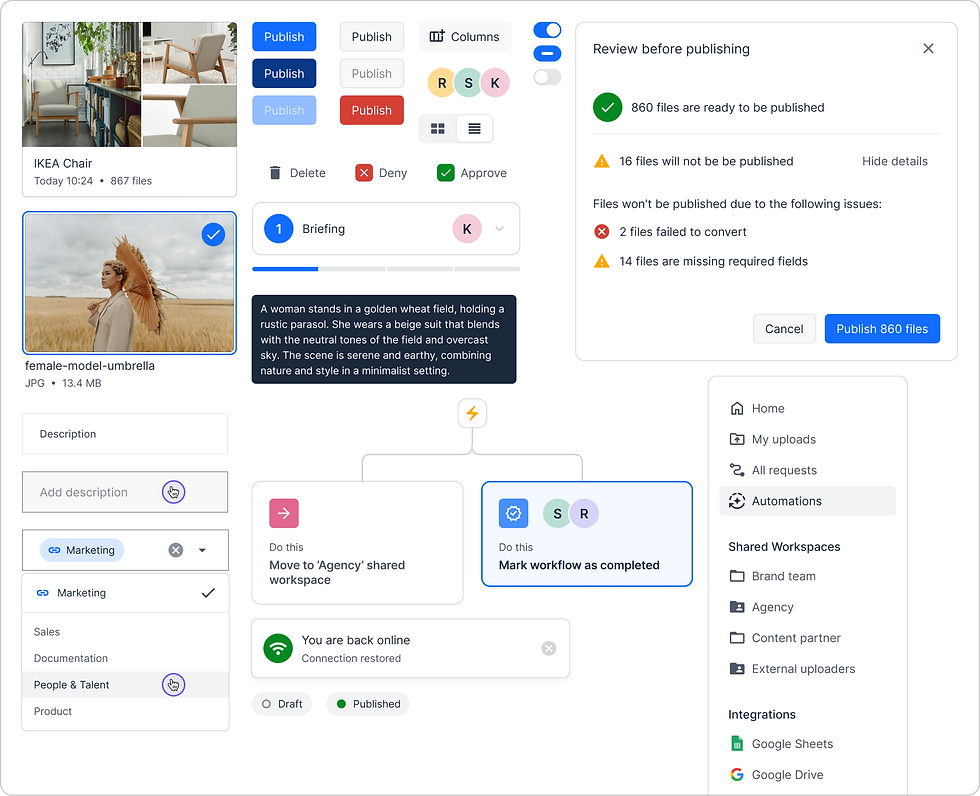
Before I joined, Bynder had a small but rapidly growing design system. While working on this project, I quickly realized that many new components would need to be built specifically to meet its requirements. I collaborated closely with developers to bring these components to life in code. Over time, developers began approaching me with requests to modify components for other use cases. As these requests became more frequent, I proactively reached out to the Design System lead. This collaboration not only streamlined component development but also led to me becoming an active contributor to the Bynder Design System, helping it evolve to support broader needs across the organization.
Impact and Conclusion
These are just the highlights, though. As a result of my work, our North Star (number of files uploaded) increased by 64%, the total number of assets increased by 17%, error rates decreased by 12%, and the SUS (system usability score) rating improved from 60 to 85+.
Additionally, because of the increase in efficiency, the new uploader decreased the time to onboard a new customer by a third. This created significant business impact as in the quarter of the uploader’s release (Q4 ‘24) Bynder signed twice as many new contracts.
bottom of page